
An update on my FOSS downloader extension recommended by Mozilla!
I just updated to a new major release of Media Downloader Unleashed!!, my #firefox add-on to download audio and video from sites that got recommended by #mozilla !
https://addons.mozilla.org/addon/media-downloader-unleashed?utm%5C_source=fedi-share
Mainly, a better media list, more supported sites (even those using a wrong file format!), and some fixes and improvements!
Changelog is too long for the character limit so you can read it all here :
https://github.com/helloyanis/media-downloader-unleashed/releases/tag/v4.2.0
It’s just out, so there might still be some bugs, so if you want to try it be sure to leave me any feedback! Thanks! :blobcatheart:
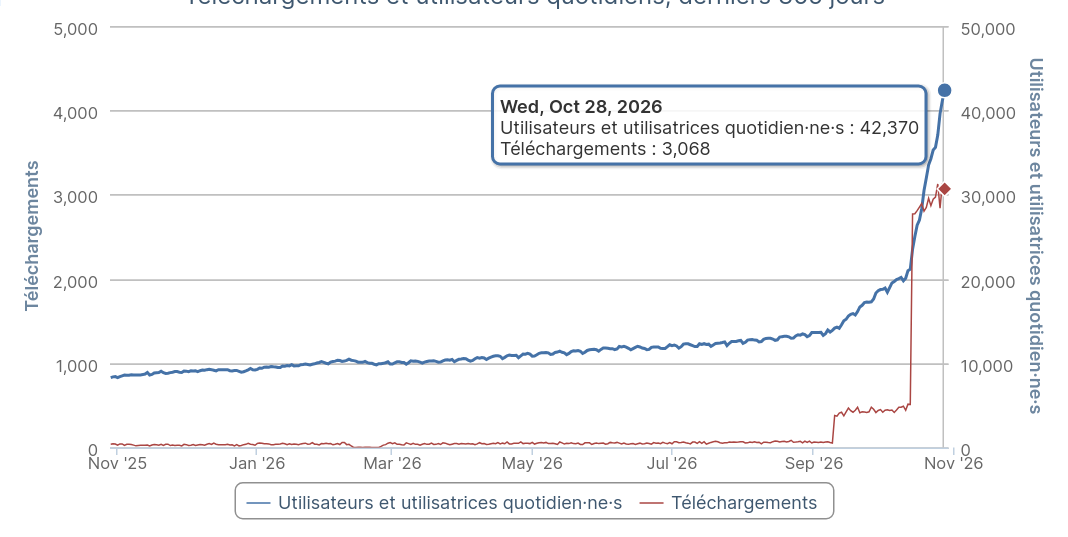
Now for the fun part : Since it got recommended by Mozilla, it appears as a suggestion within the browser, which lead to the amount of users BLOWING UP!! LOOK AT THIS GRAPH IT’S INSANE! THANKS SO MUCH!!!? 🧡🧡
I guess it’s a great reward for making great work!!
#foss #opensource #devlog #web #webdev #mediadownloaderunleashed
I was dubious. “What could this possibly do” I thought, “that yt-dlp can’t?”.
I pointed it at a video on Substack that I’ve been wanting to watch offline (that platform is just shite) and after a little getting tripped up by the UI… boom. 1hr of video just in my
Downloads/folder.Thanks. This is pretty great.
@danielquinn Well, yt-dlp I think adds per-site support. This extension just looks at the outgoing media requests from your browser, stores and reproduces them (with a few optimizations, like caching media as it gets loaded by sites so you don’t need to re-request the server sometimes), and has no site-specific support. So both have their advantages and flaws!
Are there any particular problems you encountered with the UI?
And I’m glad you like it!! Thanks for trying it!!
It just wasn’t clear what was being downloaded.
For example, here’s a screenshot of the UI when I tried to use it on this page (I was logged in at the time, which grants access to the full video):

The UI presents 3 options, all of which are basically identical, each with impossible file sizes. I ended up clicking
[]on each of them 'til I found the full-length video. The preview opens up in a new tab, rather than inline or in a pop-up which wasn’t ideal (I had like 20 tabs open, now my extension tab was on the left and the preview for one of the streams was way over on the right).It worked well though, once I had the above figured out. Here are my suggestions if you’re interested:
- When the download options are > 1, try to interrogate the streams a little more for basic information like length, dimensions, bitrate, etc. In my case above, it looks like this was presenting multiple streams of the same full-length video, but in different resolutions, along with a separate opening clip for the Zeteo logo, and another clip for the promotional video. It would have been obvious to find the best quality full-length video with just those three metrics above.
- Maybe sort the list of streams based on the above and give the user the option to sort/filter?
- Introduce a preview button that renders in-line like you see on Lemmy or Reddit. It would have saved a lot of hassle with my tab hopping.
Regardless, it’s a great job, so thank you for sharing it! Now I can watch Zeteo videos on my own time without that useless Substack app!
Oh cool thats useful. Downloaded
This is great. I had been using faststream before but it got removed and it also had problems with sites that used Anubis as (i think) it wasn’t using the same browser session and creating a new request, which was blocked.
https://github.com/Andrews54757/FastStream
I tried your extension on redlib and while it grabbed the hls video url, it listed too many in the downloader UI. It probably needs a cleanup.
Thanks!
I installed it but I don’t see how you start the download of a video
@corvus Well, usually just start playing a video then open the extension, it should appear there!
i just downloaded it, thank you for building this!
There is no recommendation from firefox. What is your source for that claim?
I believe they mean this badge on the extension page.

It has the “recommended” add on badge on the extension page.
It seems to differ on desktop vs mobile
That’s the most important info, thx!
@illusionist The store page and the email exchange I had with them? See the “Recommended” badge
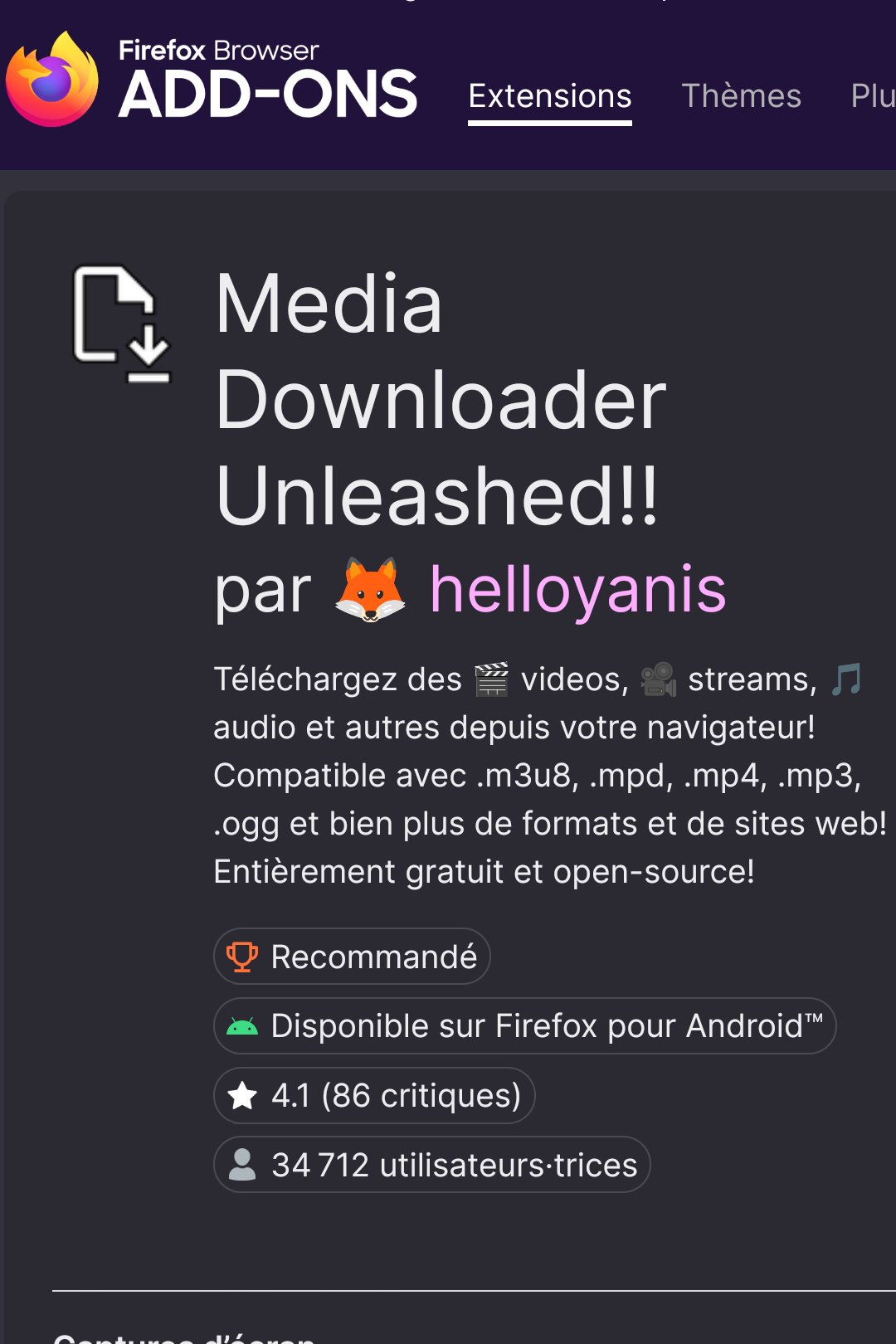
I doubted it because on mobile, there is no recommendation!
Thx and kudos!
@illusionist Yeah I think the recommended status is only for PC. From what it looks like, the android store has its own set of recommended extensions, and although it works well there, it doesn’t seem to be recommended on Android. I’ll ask them if that’s intentional!